
By Made Deliberate · October 8, 2026
MakeCode Arcade for homeschool beginners
“I want to make a video game” can sound like a request for equipment, software and a parent who knows how to code. The first step can be much smaller: give one character a job and help your child make it happen.
Microsoft MakeCode Arcade is a free game-building editor that runs in a web browser. Children can begin with visual coding blocks and play their projects in the on-screen simulator. You can learn alongside your child, with a tutorial open and permission to work through one problem at a time.
What do you need to get started?
Start with a computer or Chromebook, internet access and a supported browser. A keyboard and mouse or trackpad give you room to work with the blocks and simulator. MakeCode also supports mobile browsers, but check Microsoft’s current browser compatibility list for the device you plan to use.
You can begin in the browser without buying a handheld console. MakeCode’s overview of Arcade explains how projects work in the browser and on compatible hardware. For the first project, being able to move a character on the screen is plenty.
Choose a small first project
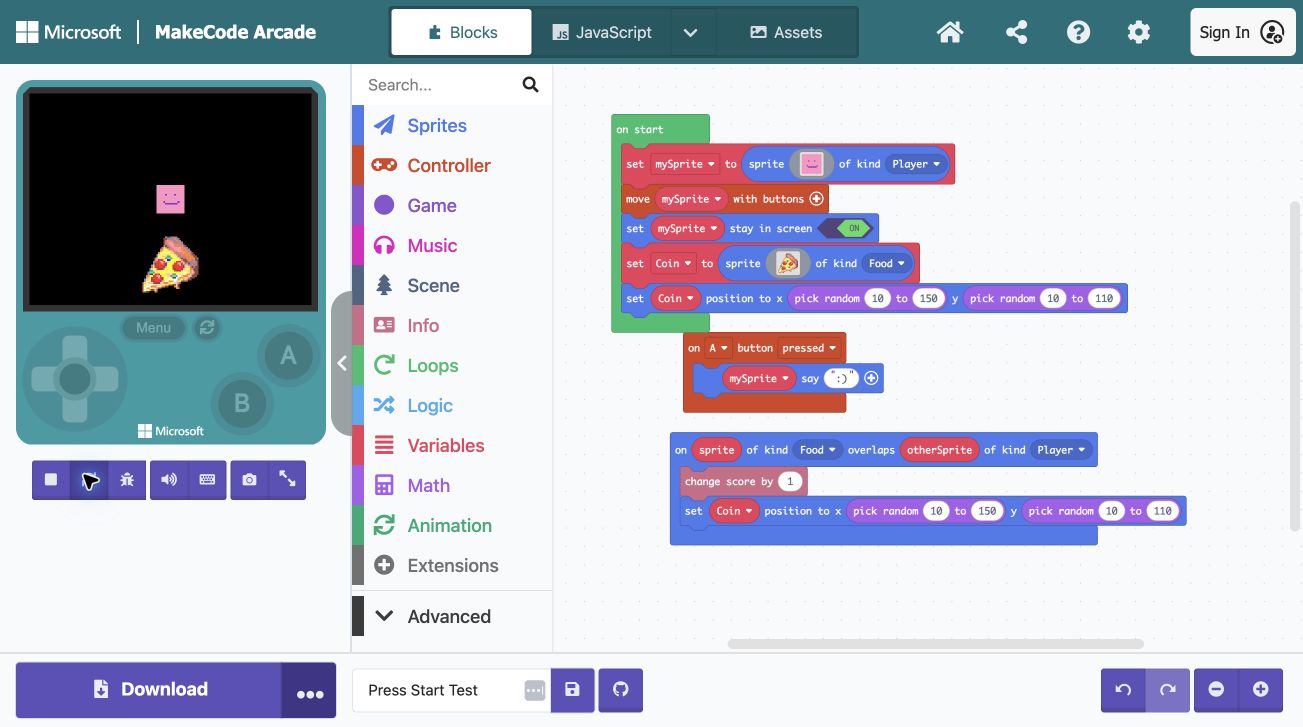
Microsoft’s Chase the Pizza tutorial is one place to begin. It walks through creating a character, controlling its movement and collecting food, then adds scoring and a countdown.
Work in small pieces. Once the character moves, pause and let your child try the controls. Ask what they think the next block will change before adding it. After the tutorial works, let them choose one personal change, such as drawing their own character or changing the background.
The goal for a first session can simply be a character that responds to a button and a child who can explain why. You can return to the rest later.
What are they learning when they move the blocks?
Ask your child to explain a few decisions in their own words. You do not need to turn every block into a vocabulary quiz.
- Sequence: What needs to happen first when the game starts?
- Events: What should happen when a button is pressed or two characters meet?
- Variables: What information changes while someone plays, such as score or lives?
- Conditions: What should happen if a particular condition is true?
- Debugging: What did you expect, what actually happened, and what could you test?
These questions become useful as projects grow. You do not need to introduce every concept before your child has something they want to make.
What if the game does something unexpected?
Try to make the problem specific. Instead of changing several blocks at once, ask your child to show the exact action that causes it. Does the score change at the wrong moment? Does the character move before it should?
Write down what you expected, change one thing and try again. If you are both stuck, return to the tutorial step that last worked. A short note about the problem makes it easier to pick up the project another day.
You can practice this approach away from the screen too. Our paper game design activities include testing rules and keeping a small bug journal.
Save their work before you close the browser
Give each project a recognizable name and keep a downloaded copy. MakeCode stores projects in the browser’s local storage, which can be removed when browser data is cleared. Microsoft’s saving guide explains how projects are stored.
Before making a large change, save another copy with a name your child understands, such as “Forest game before adding lives.” Having a working version to return to makes experimenting less frustrating.
When they are ready for someone else to play, sitting together at the same device is a simple first option. If you choose to share a link, review Microsoft’s sharing guidance together: shared projects let other people view and copy the code, and an anonymous share link cannot simply be unpublished. Keep personal details out of the project.
Where does MakeCode fit in Press Start?
Press Start: From Player to Game Maker is our printable homeschool unit study for ages 7 to 11. It provides the teaching plans and Player activities; MakeCode Arcade is the separate, free tool used to build the game.
Players begin with games, paper designs and prototypes in Worlds 1 to 3. MakeCode coding starts in World 4, then develops alongside experiments, reading, digital citizenship and testing. The project grows into an original character, three playable levels and a game to share with family and friends.
No previous coding experience is needed. The unit includes instructions and troubleshooting notes for the adult Guide. A compatible handheld is optional, and books and supplies are purchased or borrowed separately.